
Automated Countdown for Taobao Flash Sales
Overview
The software is designed to assist users in participating in Taobao's flash sale events by automating the countdown and checkout process. It integrates directly with the Taobao interface, enabling users to prepare for high-demand sales by logging in in advance and activating a one-click purchase lock. This functionality aims to reduce manual intervention during time-sensitive promotions, minimizing the risk of missing out due to slow response times. The tool is particularly useful for consumers who frequently engage in online shopping during major sales events such as Singles' Day or other seasonal campaigns.
Target users include online shoppers, bargain hunters, and individuals seeking to streamline their purchasing workflow during peak e-commerce periods. The software does not provide details about the developer, and no additional background information is available. Real-world usage scenarios include preparing for limited-time product releases, securing discounted items, and improving the success rate of rapid purchases during high-traffic periods. The tool is intended for use on desktop platforms, allowing users to run it alongside their primary web browser.
Key Features & Capabilities
- Integrated Taobao Interface Support – The software is built to work directly with the Taobao shopping platform, recognizing and interacting with the countdown and flash sale sections in real time.
- Pre-Login Functionality – Users can log in to their Taobao accounts in advance, ensuring that authentication is already completed when the sale begins.
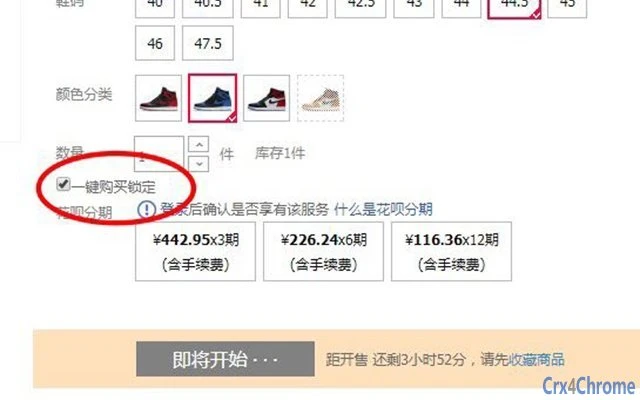
- One-Click Purchase Lock – After setup, users can activate a pre-confirmation state, which locks in the purchase details for immediate execution when the sale starts.
- Speed Optimization for Checkout – The tool reduces the time required to complete the purchase process by minimizing manual steps during the sale window.
- Real-Time Countdown Synchronization – The software monitors the Taobao sale timer and aligns its internal state with the live countdown, ensuring timing accuracy.
These features are intended to enhance the user experience during high-pressure shopping events. For example, a user preparing for a flash sale on a limited-edition product can log in ahead of time, enable the one-click lock, and focus only on maintaining a stable internet connection. The software does not alter the Taobao website’s behavior beyond the scope of the provided functionality.
User Interface, Workflow & Performance
The user interface is designed to be minimal and task-focused, with a central display for the countdown timer and a clear activation button for the one-click purchase lock. Navigation is straightforward, allowing users to access login settings, configuration options, and real-time status indicators with minimal clicks. The workflow is linear: log in, enable the lock, wait for the sale, and complete the purchase when the timer reaches zero.
Performance observations are based on general software behavior patterns. The software operates in the background while the user browses Taobao, consuming minimal system resources. The developer did not specify resource usage details. Stability during extended use has not been publicly documented. Users are advised to ensure their internet connection remains consistent during active use, as the tool’s effectiveness depends on network speed and latency.
Compatibility & System Requirements
The software is compatible with Windows, Mac, and Linux operating systems, making it accessible to a wide range of desktop users. The current version is 1.2.3, with a file size of 15.7 MB, indicating a lightweight installation. The developer did not provide additional system requirements, and no specific hardware specifications were listed. Compatibility information was partially provided, and users should verify functionality on their specific system configurations.
Installation is straightforward, requiring no advanced technical knowledge. The software does not require administrator privileges for basic operation. Users should ensure their system meets general desktop application requirements to avoid startup issues.
Pros and Cons
Pros
- Designed specifically for Taobao flash sales, offering targeted automation
- One-click purchase lock reduces manual input during high-pressure events
- Pre-login support streamlines the purchase workflow
- Lightweight at 15.7 MB, suitable for older or low-spec systems
- Available at no cost, making it accessible to a broad audience
Cons
- No official developer information available
- Performance and resource usage details not disclosed
- Relies entirely on internet speed for successful execution
- Compatibility with specific Taobao interface versions not confirmed
- Does not include error handling or failure recovery mechanisms
FAQ Section
Is the software compatible with all Taobao interface versions?
Compatibility with specific Taobao interface versions is not confirmed. Users should ensure their Taobao page layout matches the expected format for optimal performance.
Is the software safe to use during flash sales?
The software does not alter browser behavior beyond the intended automation features. Users should ensure they are using a trusted source for the download to avoid security risks.
Does the software require an internet connection to function?
Yes, a stable internet connection is required to maintain login status, synchronize the countdown, and complete the purchase.
Can I use the software on multiple operating systems?
Yes, the software is compatible with Windows, Mac, and Linux, allowing cross-platform use.
Is the software updated regularly?
Version 1.2.3 was released on September 15, 2024. The update frequency is not specified, but users should check for new versions to maintain compatibility with Taobao’s interface changes.
Final Thoughts
This tool offers a focused solution for users aiming to improve their success rate during Taobao flash sales. Its automation of the pre-login and one-click purchase process provides a tangible advantage in fast-paced e-commerce environments. While the lack of developer transparency and detailed performance data limits full confidence, the software’s lightweight design and free access make it a compelling option for frequent online shoppers. It is best suited for individuals who value efficiency and speed during limited-time promotions. For those preparing for major shopping events, this tool could be a decisive factor in securing desired items.
Download Automated Countdown for Taobao Flash Sales now







